Skip to content
starvia home
STEM paths for ages 12–16

Build real things. Break them. Fix them.

starvia teaches coding, AI, electronics and data by doing. Short hands-on missions, a real project at the end of every path, and no clock ticking. Buy a path once and it's yours for life.

  • No subscription
  • Lifetime access
  • Most paths work on a phone
python-from-zero / mission-04.pyTRY IT
The rocket never says "1".

It only launches at 1. Tap the highlighted value to change it, then run.

for i in range(10, , -1):
print(i)
if i == 1:
launch()
$ ready. press Run.
Hint: range() stops before its end value.
Paths

Pick something you want to make.

Every path is a set of short missions that ends in a finished project you can show people. Start with whatever interests you.

All 17 paths

CodeBetaReady now

RPG Quest in Godot

Build a small 2D RPG with a story, quests and turn-based battles.

~21 hoursIntermediate

Laptop needed

£39for lifeGift it →
DataReady now

Data Detectives

Build charts and a short report that answer a question you chose.

~7 hoursBeginner

£29for lifeGift it →
AIReady now

Human in the Loop

Build a Python tool built with an AI model, guarded by your own tests and checks.

~16 hoursAdvanced

£39for lifeGift it →
How it works

How a mission works.

Each mission is a small problem to solve, with a code editor or circuit to work on and checks that tell you when it works.

  1. 01

    Choose a path

    Buy it yourself or open a gift code. It shows up in your library straight away.

  2. 02

    Work through missions

    Each takes 20 to 60 minutes. Write code, run it, see what breaks, fix it.

  3. 03

    Ship the project

    The last mission is a full build: a game, a site, a trained model. It's yours to keep and share.

  4. 04

    Go further

    Finished paths unlock suggested next steps. Revisit any mission, any time, forever.

starvia.io/learn/how-ai-works/05

How AI Actually Works

4 of 14 missions · paused 9 days ago
  1. What is a model? (completed)
  2. Teach it with examples (completed)
  3. Training vs testing (completed)
  4. Collect your own dataset (completed)
  5. Train a sketch classifier (current mission)
  6. Why it gets things wrong (not started)
  7. Bias in the data (not started)
  8. 7 more missions
  9. Project: Doodle Guesser (final project)
Mission 05 · about 40 min

Train a sketch classifier

Picked up where you left off
goals2 / 4
  • Load 3 classes: cat, house, bike (done)
  • Split data 80 / 20 (done)
  • Train for 5 epochs (to do)
  • Get test accuracy above 85% (to do)
train.py▶ run
model.fit(train, epochs=5)
acc = model.test(test)
print(f"accuracy: {acc:.0%}")
accuracy: 71%
Stuck? Hints come in three levels. Level 1 nudges you toward where to look. Level 3 shows a worked example. You choose when to open them.
  • no streaks
  • no deadlines
  • no leaderboards
  • pause for exams, come back whenever
Games

Games you'll make.

Two paths make games in Godot, the free engine used by indie studios. Both need a laptop, because Godot is a desktop app.
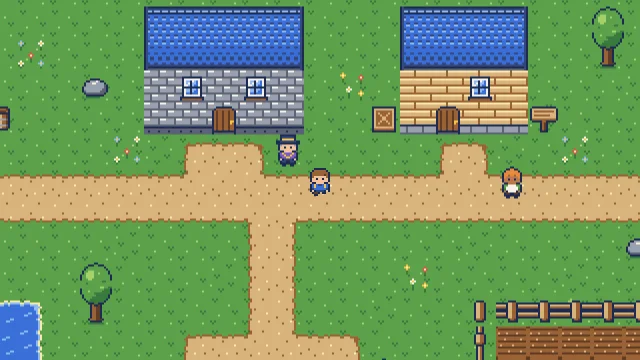
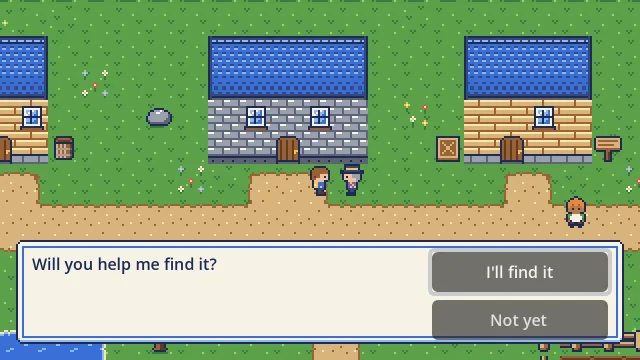
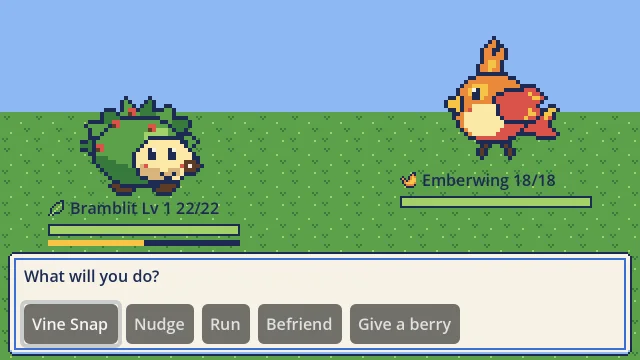
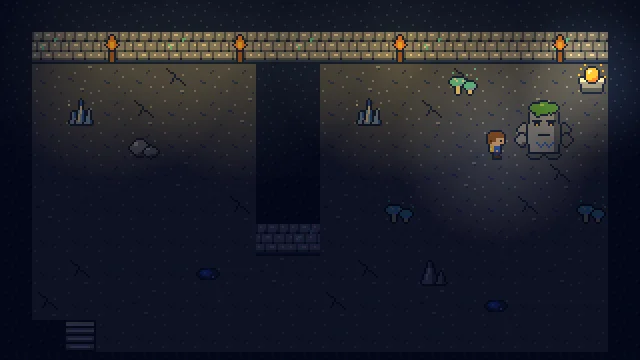
A pixel-art village with stone and wooden houses, a dirt path, three villagers and a pond.A villager asks “Will you help me find it?” and two buttons answer “I'll find it” and “Not yet”.A battle between Bramblit, a leafy creature, and Emberwing, a fire bird. The buttons say Vine Snap, Nudge, Run, Befriend and Give a berry.A dark cave lit by wall torches. The player stands beside a stone guardian, near a glowing stone on a pedestal.
From Fernhollow, a game made by following the missions.
Ready now

RPG Quest in Godot

A top-down RPG with a village to explore, people to talk to, quests, a shop and turn-based battles where you can befriend creatures. It starts from installing Godot, and you learn GDScript as the game needs it.

21 missions · about 21 hours · £39
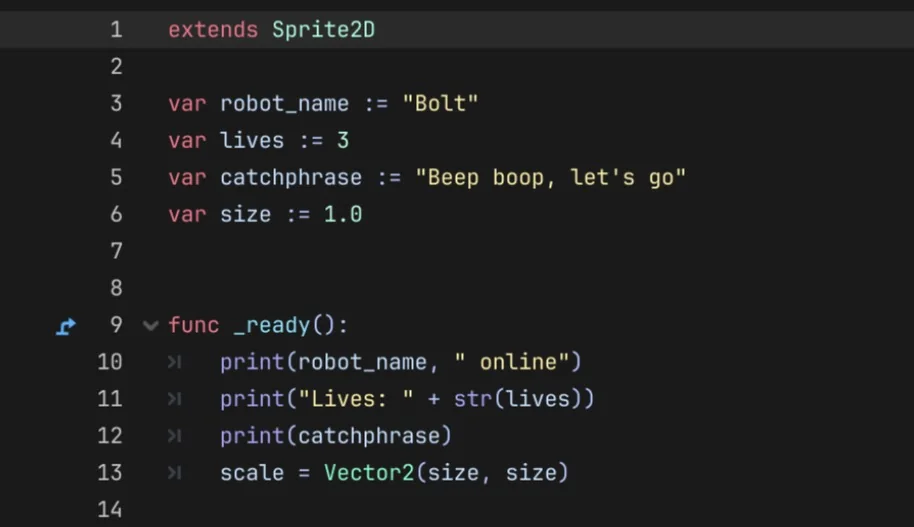
A GDScript file in the Godot editor that gives a robot a name, 3 lives and a catchphrase, and prints them when the game starts.
Your first script, from mission 3.
Ready now

Game Dev in Godot

A three-level 2D platformer, exported so friends can play it in a browser. You learn GDScript as the game needs it, starting with a robot that prints its own name.

20 missions · about 16 hours · £39

Beyond the code

Code is one part of the job.

People who build software spend much of their day understanding problems, talking to users and working with their team. As AI writes more of the code, those skills count for even more. Every path practises them, and three paths focus on them.

Focus paths:Design for Humans →Build Something People Want →Work Like a Dev Team →

users()

Thinking about users

Projects get tested on real people. You watch someone use what you made, notice where they get stuck, and improve it.

explain()

Explaining your work

Every project ends with a short write-up and a demo, so you practise describing what you made.

review()

Giving and taking feedback

Learn to review someone else's work kindly and usefully, and to hear criticism of your own without taking it personally.

split()

Breaking problems down

Big problems get split into small steps you can test one at a time.

Written by engineers

Good with AI. Good without it.

Every path is written and reviewed by engineers who use AI in their work every day. We teach young people to use it well, to know its limits, and to keep their own understanding, so they're in charge of what they build.

use()

Using AI well

AI is a powerful tool and learners will use it for life. Missions show where it speeds you up, like explaining an error or suggesting an approach, and how to ask it good questions.

limits()

Knowing its limits

AI can be wrong, out of date or missing context, and it sounds confident either way. Missions have you check its answers, so you learn when to trust it.

understand()

Keeping your own understanding

Missions ask you to explain, predict and change code yourself, so AI adds to what you know instead of replacing it.

think()

Skills that carry over

Tools change every year, AI included. Breaking problems down, reasoning about systems and debugging carry over to whatever comes next.

Gifting

Give a path as a gift.

Pick a path, write a note, choose when it arrives. They get an email with a redeem code on the day. Nothing renews and there's no card to cancel later.

For under-13s, use a parent's email. Leave it blank to pass the code on yourself.

Only used when we email it.

After you pay, we email you a copy of the gift code too. Gift codes never expire. Changed your mind? Ask for a refund within 14 days of buying.

GIFT
lifetime access
for
Maya
unlock("Python from Zero")
Happy 13th! You kept asking how games are made. Now you can find out.
From Auntie Jo
REDEEM CODE (EXAMPLE)
OB-7K4F-2QX9
arrives
now
For parents and gift-givers

What parents want to know.

What they do on starvia, who they can talk to, and what we keep about them.

no_ads()

No ads, no tracking

We don't sell data or run third-party trackers. The only thing we store is progress and projects.

no_dms()

No chat, no public profiles

Learners can't message anyone on starvia, and nobody can see what they make except you and their teacher.

consent()

You set them up

Under-13s can't make their own account. You create it, give consent, and can see their progress, download it or delete it.

any_device()

Works on their phone

Most paths work on a phone, tablet or laptop in any modern browser, with nothing to install. If a path needs a laptop, we tell you before you buy.

real_skills()

Real tools

Python, JavaScript, Godot, real datasets. The same tools used in industry, taught at their level.

own_it()

Theirs forever

Paths stay in their library for life, including updates. Projects can be downloaded any time.

Pricing

What it costs.

Each price is a single payment, and the paths stay in your library for life. You can buy for yourself or send any of them as a gift.

One path

£24–39once

Try a single subject properly.

  • Every mission in the path
  • Final project and certificate
  • Future updates to that path

Full library

£199once

Every path on the site: 16 ready now.

  • 16 paths to start straight away
  • monthly fee
  • auto-renewal
  • card kept on file
  • “premium” upsells
  • sales or countdowns

Prices are set for the UK. Outside the UK they're adjusted for local purchasing power, so a path costs about the same share of a family's budget wherever you are.

Questions

Things people ask before buying.

Why learn to code when AI can write it?
Because the people who get the most out of AI understand what it's doing. AI is a brilliant tool for writing and explaining code, and the paths use it. Deciding what to build, checking that it works and fixing it when it doesn't still take your own understanding. The paths build both: using AI well, and knowing the subject yourself.
Is it worth waiting for a sale?
No. We never run sales, Black Friday deals or limited-time offers, so the price you see is the price everyone pays, whenever they buy. Outside the UK, prices are adjusted for local purchasing power all year round.
Why is the price different in my country?
Outside the UK, prices are lower where living costs are lower, so a path costs about the same share of a family's budget wherever they live. The UK price is the most anyone pays. We use the country you're in and the country your card is from. The terms explain the details.
Can they do it on a phone?
Most paths work start to finish on a phone. Many steps let you tap to change code instead of typing it, though longer coding missions are more comfortable on a tablet or laptop. If a path needs a laptop, we make that clear on its card, its page and the gift form before you buy.
What if they've never coded before?
Most paths start from zero. Each path page lists what you need to know first, and the beginner paths assume nothing beyond typing.
How long does a path take?
Between 6 and 21 hours in total, depending on the path. Each path's page says how long it takes. Some learners finish in a fortnight of half-term; others do one mission a week over a term. Both are fine.
Is it too young for 16-year-olds, or too hard for 12?
Paths are written for the whole range. The explanations stay plain, the problems get properly hard, and the optional "go further" tasks stretch older learners.
Do learners keep what they make?
Yes. Projects and code can be downloaded at any time as ordinary files that open outside starvia too, so the work is theirs whatever happens. If starvia ever closed, we'd give everyone plenty of notice to download it all.
Can I get a refund?
Yes. Ask within 14 days of paying and you get all your money back, for any reason, even after the learner has started. Email hello@starvia.io or reply to your receipt. After that, you're still covered if a path is faulty.
We've lost a family or class code, or can't sign in. What now?
Ask the adult who set the account up for a new code. A parent can make one from their account page, and a teacher from their class page; the old code stops working. If you sign in with email, ask for a new sign-in code and check your spam folder. Still stuck? Email hello@starvia.io.
The gift code didn't arrive. What should we do?
Check the spam folder first. The person who bought the gift also got the code by email, so they can pass it on. Until the gift is delivered, they can fix the recipient's email address or the date. If it's still missing, email hello@starvia.io from the buyer's email address and we'll send it again.
How do I delete our data?
From your account page. Delete account removes your account and every learner you set up, straight away. Use Download my data first if you want a copy. We keep a record of what was bought, without names or email addresses, for 6 years because tax law requires it.
Who can see my child's work?
Your child, you if you set up their account, and their teacher if they're in a class. Nobody else: there are no public profiles and no messaging. If your child signed up themselves and linked your account, you can see which paths they have but not their work.
Do you charge VAT?
No. We're not registered for VAT, so the price shown is the whole price.
How do you keep learners safe?
By design. There's no messaging, no public profiles and no shared projects, so nobody can contact a learner through starvia. A person checks every teacher account before it can see students' work. Concerns go to safeguarding@starvia.io. It isn't watched around the clock, so if a child is in immediate danger, call 999.
Can one purchase be shared between siblings?
Yes. Paths are for your household, like a book on the shelf. Add each child as a learner on your account and whatever you buy opens for all of them. If friends would get something out of it, tell them about us.